
AI agents become useful when they can do more than generate text. A business agent may need to retrieve customer information, check an order, analyze a report, create a task, update a CRM record, or trigger a workflow. That requires reliable connections to the systems where business data and actions actually live.
This is where the Model Context Protocol (MCP) matters. MCP is an open protocol designed to standardize how AI applications connect with tools, data, and other capabilities. In 2026, the protocol has moved beyond its early experimentation phase: the 2026-07-28 MCP specification introduced a stateless protocol core, cacheable list results, header-based routing, authorization hardening, and a formal extensions framework.
For businesses, the important question is not simply “Should we use MCP?” It is “Where can a standard integration layer make our AI architecture easier to build, govern, and scale?”
What Is MCP?
Think of MCP as a common language between an AI application and the business systems it needs to use.
Without a standard protocol, every AI application can end up with its own custom connectors. A team might build one integration for a CRM, another for an analytics platform, another for internal documents, and another for a support system. As the number of agents and systems grows, that approach can create duplicated engineering work and inconsistent security controls.
MCP provides a standardized protocol for exposing capabilities to AI clients. Depending on the implementation, those capabilities can include tools that perform actions, resources that provide information, and prompts or other protocol features that help clients work with a server.
The practical idea is simple: instead of tightly coupling every AI application to every backend, businesses can build or adopt MCP-compatible servers that expose approved capabilities in a consistent way.
Why MCP Matters for Business AI
The biggest shift in business AI is moving from answers to actions. An AI assistant that summarizes a sales report is useful. An AI system that can safely retrieve the relevant pipeline data, identify exceptions, prepare a follow-up task, and request approval before changing a CRM record can become part of an operational workflow.
That transition creates an integration problem.
Business applications are rarely isolated. Customer data may live in Salesforce, financial information may be stored in an ERP, marketing activity may sit across advertising and automation platforms, and management reporting may be handled in Power BI. AI systems need controlled access to these environments without turning every agent project into a new integration project.
MCP can serve as an interoperability layer between those AI applications and the systems they need to interact with.
How MCP Fits Into an AI Architecture
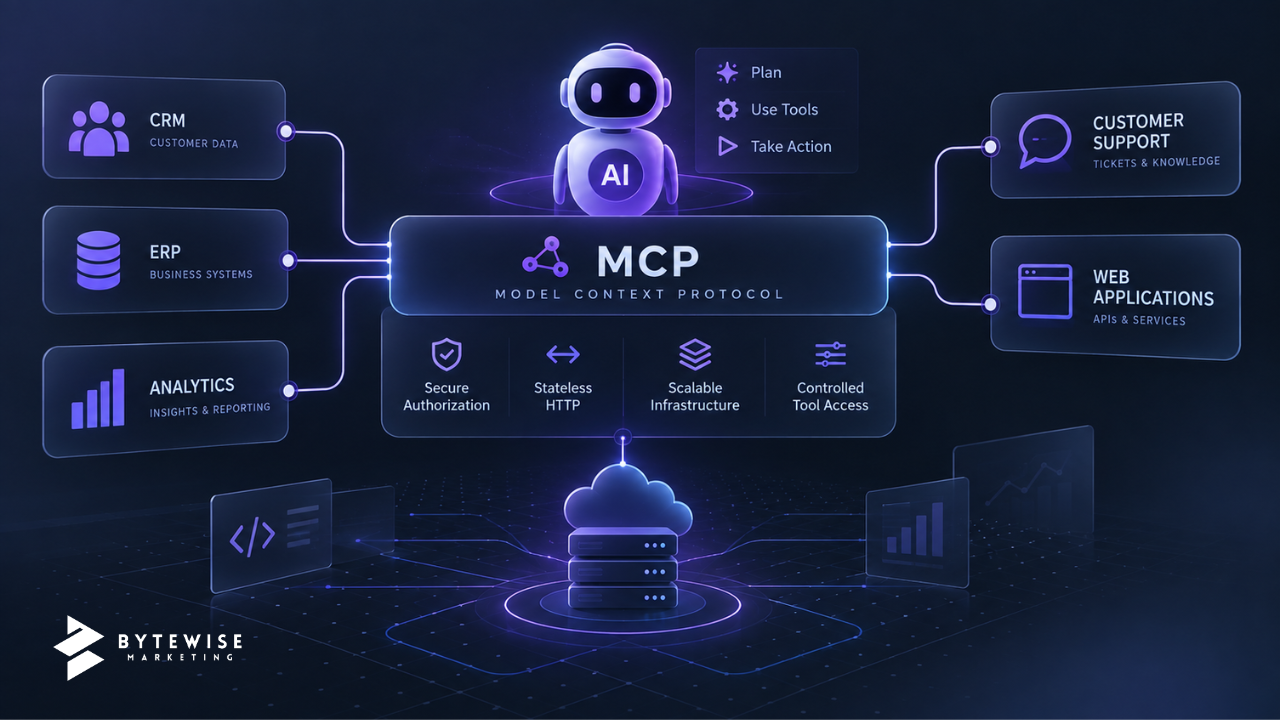
A typical architecture can be thought of as four layers:
- AI client or agent: The application that reasons about a task and decides which capabilities it needs.
- MCP client: The component that communicates with MCP servers and discovers or invokes available capabilities.
- MCP server: The controlled integration layer that exposes selected tools, data, or workflows.
- Business systems: CRM, ERP, databases, analytics platforms, customer-support systems, internal applications, and other sources of business data or actions.
The MCP server should not be treated as a magic security boundary. It is an integration component that still needs authentication, authorization, input validation, logging, monitoring, rate limits, and business rules appropriate to the actions it exposes.
That distinction is important. A protocol can standardize communication, but it does not automatically make an AI workflow safe.
What Can Businesses Connect With MCP?
MCP is most interesting when an AI workflow crosses system boundaries. Common business use cases include:
1. CRM and Sales Operations
An AI sales assistant could retrieve approved customer information, inspect opportunity details, summarize recent activity, or prepare a next-step task. Write operations should be narrowly scoped and protected with appropriate permissions and approval controls.
This is particularly relevant for organizations already investing in Salesforce development and integration. MCP does not replace Salesforce APIs or automation. It can provide another standardized interface through which AI applications access selected Salesforce capabilities.
2. Business Intelligence and Reporting
An AI assistant can be connected to governed analytics capabilities so managers can ask questions in natural language and receive answers based on approved data models.
For example, an agent might retrieve a sales KPI, compare it with a defined threshold, and prepare a management summary. The underlying metric definitions and permissions still need to come from a trusted analytics environment.
Businesses building this foundation can also benefit from Power BI consulting and analytics, particularly where data integration, semantic models, reporting automation, and governance need to be addressed together.
3. Customer Support
An AI support workflow could retrieve approved knowledge, inspect a customer’s support history, draft a response, and create or update a ticket through controlled tools.
The key is to separate read access from write access. Reading a knowledge article is not equivalent to changing an account, issuing a refund, or closing a case.
4. Internal Operations
MCP can also support internal workflows such as document retrieval, project updates, task preparation, knowledge searches, and recurring operational checks.
These use cases are often easier to pilot because organizations can keep the scope narrow and introduce human review before actions affect customers or important business records.
5. Marketing Workflows
An AI system could combine approved campaign data, content systems, analytics, and workflow tools to prepare performance summaries or suggest next actions.
For businesses building broader automation, MCP can complement existing AI workflow integration rather than requiring every workflow to be rebuilt around a single AI platform.
What Changed With the 2026-07-28 MCP Specification?
The July 2026 specification is particularly relevant to businesses thinking about production architecture.
Stateless protocol core
The 2026-07-28 specification moves MCP toward a stateless request/response model. Requests can be handled by different server instances without relying on protocol-level sessions. For infrastructure teams, that can simplify horizontal scaling and load balancing.
Header-based routing
Method and tool information can travel in HTTP headers, giving gateways and infrastructure components a more direct way to route, authorize, and meter MCP traffic without relying entirely on application payload inspection.
Cacheable list results
List responses can carry cache hints. This can reduce unnecessary discovery calls and make tool catalogs more efficient for clients that need to repeatedly discover available capabilities.
Authorization hardening
The 2026-07-28 release includes several authorization improvements, including stronger issuer validation and changes around client credentials and registration. These changes matter because enterprise AI integration depends as much on identity and access control as it does on model capability.
Extensions
The specification now has a formal extensions framework. Capabilities such as Tasks can evolve as extensions rather than requiring every new feature to become part of the core protocol immediately.
For organizations, that creates a more flexible architecture—but it also means teams should distinguish between stable core functionality, supported extensions, and features that may require additional compatibility planning.
MCP vs. Traditional API Integrations
MCP does not make conventional APIs obsolete. APIs remain the underlying mechanism for many business integrations.
The difference is the abstraction layer presented to AI applications.
| Approach | Typical Strength | Business Consideration |
|---|---|---|
| Direct API integration | Maximum control over a specific application | Can require custom work for each AI application |
| Custom AI connector | Fast path for one targeted workflow | May create duplicated integration logic as AI use grows |
| MCP-based integration | Standardized interface for AI clients and capabilities | Requires thoughtful server design, permissions, governance, and lifecycle management |
The right architecture may use all three. A company can keep its existing APIs, place selected business capabilities behind MCP servers, and use direct integrations where they provide a better fit.
Security Considerations Before You Adopt MCP
MCP should be introduced as part of an application-security and governance program, not as a shortcut around one.
Limit tools to the minimum necessary
An agent that only needs to read account information should not automatically receive tools capable of modifying accounts. Apply least privilege at the tool and data level.
Separate read and write operations
Read-only tools are generally easier to govern. For consequential actions, use explicit permissions, validation, approvals, and audit trails where appropriate.
Validate every argument
AI-generated tool arguments should be treated as untrusted input. Validate types, ranges, identifiers, business rules, and authorization before executing an operation.
Log meaningful actions
Organizations should be able to determine which client invoked a capability, what tool was requested, what authorization applied, and what outcome occurred. Logging should be designed with privacy and data-retention requirements in mind.
Control the data exposed to models
Do not expose an entire database simply because an agent might find it useful. Create narrowly defined capabilities that return the minimum information needed for the task.
Plan for failure
Business systems fail, credentials expire, services time out, and AI models sometimes choose the wrong tool. Production workflows need retries, timeouts, clear error handling, idempotency where applicable, and human escalation paths.
Bytewise’s recent guidance on AI agent governance covers the broader controls businesses should consider before moving agentic workflows into production.
A Practical MCP Adoption Plan
Businesses do not need to connect every system to MCP at once. A focused rollout is easier to measure and govern.
- Choose one high-value workflow. Start with a process where employees spend meaningful time gathering information or coordinating actions.
- Map the required systems. Identify the CRM, analytics platform, databases, documents, APIs, and business applications involved.
- Define the exact capabilities. Turn the workflow into a small set of narrowly scoped tools or resources instead of exposing entire systems.
- Define permissions before development. Decide who can use each capability, which data can be returned, which actions require approval, and what should be blocked.
- Build observability in from the beginning. Track tool usage, errors, latency, authorization outcomes, and business results.
- Test adversarially. Test malformed inputs, unauthorized requests, ambiguous instructions, stale data, service failures, and attempts to exceed tool permissions.
- Measure the workflow. Track practical outcomes such as time saved, task completion rate, error rate, escalation frequency, and user adoption.
- Expand only after the first workflow is stable. Reuse proven integration and governance patterns for additional systems.
When MCP Makes Sense—and When It May Not
MCP is especially relevant when an organization expects multiple AI applications or agents to use the same business capabilities. It can also make sense when the business wants a consistent interface between AI systems and a growing set of internal tools.
It may be unnecessary for a small, isolated AI feature that only needs one simple API call. In that situation, a direct integration can be simpler.
The architecture should follow the business problem. MCP is valuable when standardization, interoperability, controlled tool access, and scalable AI integration solve a real engineering or operational need—not simply because MCP is a current technology trend.
What Business Leaders Should Ask Their Technology Team
- Which AI workflows need access to business systems?
- Which capabilities should be read-only, and which can perform actions?
- Can we define those capabilities narrowly enough to apply least privilege?
- How will identity and authorization work across users, agents, and services?
- What data can an AI system retrieve, and what data must remain inaccessible?
- How will we audit tool calls and investigate failures?
- Which integrations should remain direct APIs rather than move behind MCP?
- How will we handle specification and extension changes over time?
How Bytewise Marketing Can Help
MCP is an integration architecture, not a standalone AI strategy. To use it effectively, businesses need the surrounding systems to be structured, accessible, secure, and governed.
Bytewise Marketing works across AI development and workflow integration, Salesforce development, Power BI and business intelligence, and web development. That combination can be useful when an AI project crosses CRM, analytics, applications, and business processes rather than living inside a single platform.
If you are evaluating an AI integration project, start with the workflow, data, permissions, and measurable outcome. From there, MCP can be considered as one part of an architecture designed to connect AI with the systems your business already depends on.
Ready to explore an AI integration use case? Contact Bytewise Marketing to discuss the workflow, systems, and technical requirements.